Telegram
Telegram Login Widget provides a secure way to authenticate users through their Telegram accounts. Unlike traditional OAuth providers, Telegram uses a widget-based approach with cryptographic verification.
Create a Telegram Bot
To use Telegram authentication, you need to create a bot through BotFather:
- Open Telegram and search for @BotFather
- Send
/newbotand follow the prompts to create your bot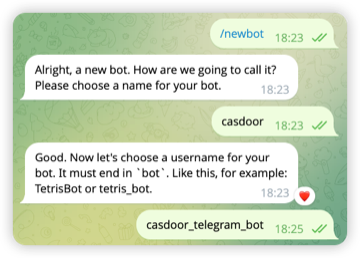
- After creation, BotFather will provide you with a bot token - save this securely
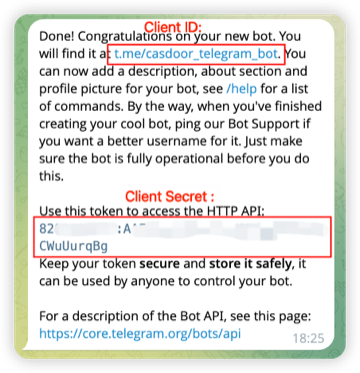
- Send
/setdomainto BotFather and provide your domain (e.g.,example.com)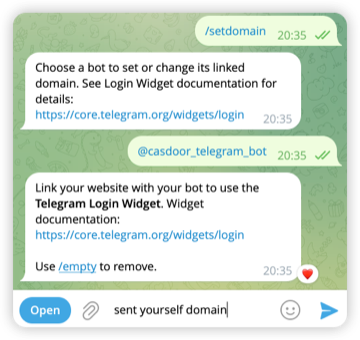
The bot token is sensitive information. Never share it publicly or commit it to version control.
Add Telegram Provider in Casdoor
- Navigate to Providers in Casdoor's admin panel
- Click Add to create a new provider
- Set Category to
OAuthand Type toTelegram - Configure the provider:
- Client ID: Your bot's username (e.g.
casdoor_telegram_botno need @) - Client Secret: The bot token provided by BotFather
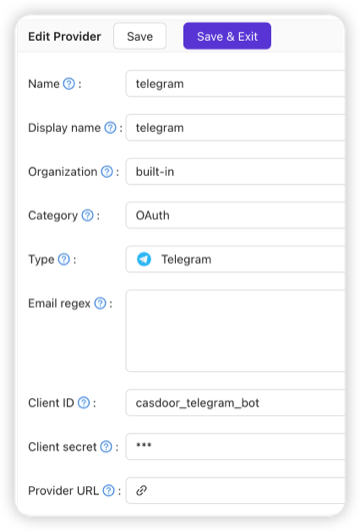
- Client ID: Your bot's username (e.g.
Domain Verification
Authentication will only work from the domain you registered with BotFather using the /setdomain command. Make sure your Casdoor instance is accessible from this domain.
Logging In with Telegram
With the setup completed, users can now log in with Telegram.
Authentication Flow
When users choose to sign in with Telegram, they authenticate directly through Telegram's widget. The process is straightforward: users click the login button, verify their identity through the Telegram app or website, and Telegram returns their profile information. Casdoor then validates this data using HMAC-SHA256 cryptographic signatures to ensure authenticity before creating or linking the user account. This verification follows Telegram's security specification to prevent tampering.
Telegram provides basic profile information including user ID, first and last name, username (if set), and profile photo (if available). Note that Telegram does not provide email addresses through the Login Widget. If your application requires email verification, you'll need to collect this separately after the initial authentication.