Overview
Casdoor is built on OAuth and utilizes tokens as users' OAuth tokens.
Access Token and ID Token
In Casdoor, the access_token and id_token are identical. Both tokens contain the same JWT payload with user information and claims. This is a design choice in Casdoor that simplifies token management.
This approach means:
- Both tokens contain the same user information and custom claims
- Both tokens can be used interchangeably for authentication and authorization
- The token format and expiration settings apply to both tokens equally
- You cannot configure separate claims for
access_tokenandid_token
Token Fields
The following are the available token fields in Casdoor:
OwnerNameCreatedTimeApplicationOrganizationUserCodeAccessTokenExpireIn(Tokens will expire in hours)Scope(Scope of authorization)TokenType(e.g.,Bearertype)
Token Lifecycle and Invalidation
Tokens in Casdoor follow a specific lifecycle from creation through invalidation. When a user logs in, Casdoor generates both an access token and a refresh token. The access token is used for authentication, while the refresh token allows obtaining new access tokens without requiring the user to log in again.
During SSO logout, Casdoor invalidates tokens by setting their ExpiresIn field to 0 or a negative value. Both the token introspection endpoint and the refresh token endpoint validate this field before processing requests. If a token has ExpiresIn <= 0, it's considered invalid and rejected with an error, even if the token itself is structurally valid and hasn't reached its original expiration time. This approach ensures that refresh tokens cannot be used to obtain new access tokens after logout, providing complete session termination across all token types.
Token Format Options
After logging into the application, there are three options to generate a JWT Token:
JWTJWT-EmptyJWT-CustomJWT-Standard
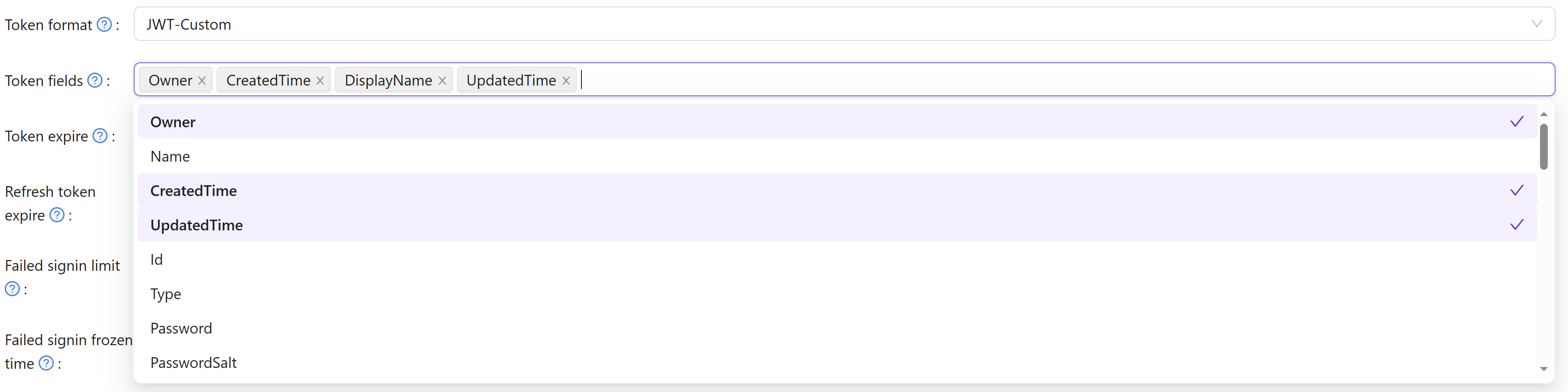
The options are as follows: JWT will generate a token containing all User fields, JWT-Empty will generate a token with all non-empty values for the user, and JWT-Custom will generate a token containing custom User Token fields (you can choose attributes in the Token fields). JWT-Standard will generate a token with some standard OIDC token fields include email, phone, gender and Address (Address value in other format is not standard).
Standard OIDC Claims
All JWT token formats include these standard OpenID Connect claims in the payload:
sub- Subject identifier (unique user ID)email- User's email addressemail_verified- Boolean indicating whether the email has been verified by Casdoornameorpreferred_username- User's display namepictureoravatar- User's avatar URL
The email_verified claim enables external applications using Casdoor as an identity provider to determine email verification status directly from the token without additional API calls.
Custom Token Attributes
When using JWT-Custom format, you can define custom attributes with their data types. Each attribute has a Type field that controls how values are included in the JWT:
- Array: The attribute value will always be returned as an array, even if it contains a single element. This ensures compatibility with OIDC clients that expect array types for fields like roles, groups, or permissions.
- String: The attribute value will be returned as a single string (the first element if multiple values exist).
Empty attributes are automatically omitted from the token to keep the payload clean. When configuring attributes for roles, groups, or permissions, using the Array type is recommended for better OIDC compliance and compatibility with systems like Rancher and Keycloak.